ChangeLog
Stay up to date
Welcome to our changelog! Here, you'll find the latest updates, including new features, improvements, and bug fixes. Stay informed about our ongoing enhancements to ensure you have the best experience possible. Check back regularly for the most current information!
10.12.25
Streamlined coordination with Follow-Up Activities
The new Follow-Up Activity feature is now available, enabling managers to create separate activities linked to an original activity or specific inputs. The system displays these relationships through icons and inside chats, while keeping each activity fully independent. Access is controlled so users only see activities they are permitted to view.
Mobile-App (Android OS), Web
Note: Do not forget to update your Mobile App (Android OS) to version 2.32.0 or higher


28.8.25
Support of multi column tables in activities
Now you can collect information in a table with multiple columns, which makes it more convenient to collect and present data, which are quite similar and repetitive in it structure.
Mobile-App (Android OS), Web
Other Improvements
User's signature can be added to reports.
Fixed slow loading performance of Advanced Remarks
Multiple minor GUI fixes with the graphical user interface
Note: Do not forget to update your mobile app (Android OS) to version 2.21.3 or higher
7.8.25
Rails and Streets added to the world map
We have added streets and railways to the map in order to make it easier for you to orientate in areas of ports. Besides, now you can search in customized drop-down lists, which makes it more convenient to find the right item you want to select.
Web
Other Improvements
Search Option in (long) drop down (custom) lists within activities
New Types of vessels (smart tags) added to vessel profile
Fixed Not able to click a check list item, if no label is added in activity.
Mandatory items are reset if left empty in activity
Fixed Pressing the Enter button when inviting a member to organization, causes page to reload.
Fixed malfunction of Find mandatory input items feature
Fixed problems with User delegation in activity
New API call for vessel's location
25.7.25
Plan Vessel Visits
A planned visitor can embark a vessel (Note: currently only one user can embark a vessel as master. Further functionality development in progress.)
Mobile-App (Android OS)
Other Improvements
Missed boarding message shows when users visit vessel earlier
Force closing the app required to login
Odd characters shown in the synchronization notification
24.7.25
Advanced Remarks
We have improved the remarks in activities. With Advanced Remarks you can now force the users to make remarks in a more structured way by using distinctive activities for it instead of just a free text field.
Web
Other Improvements
Empty chapters or input fields in activity can be excluded in generated PDF reports, if set in original blueprint.
Jump to next missing mandatory input field in activity makes it easier for the user to find what is missing to approve the activity.
New Side-Navigation (Toolbar) on dashboard (web-app). Key functionalities have been moved from the top right corner to the new toolbar on the left side.
Showing previously generated versions of a report
Fixed: Version up count delayed after new publication
Fixed: "Include a blueprint" drop down list incomplete
Fixed: Users not able to hover over the ID icon in the Activity card.
Fixed: Option List Malfunction
Fixed: Footer overlap in Activity Window Content - Details
Fixed: Organization owner has different role (Legal) in mobile.
Fixed: Some activities missing on Mobile app
Icon for Organisation's Activities not shown permanently (only on mouse-over)
Fixed: Users not able to select from all Blueprints
Fixed: Infinite Loading screen when closing the blueprint builder.
Fixed: Deleting a block should make the publish button available in blueprint builder as changes are made
Fixed: List of include blueprints not in alphabetical order when selecting an include blueprint.
Fixed: Open report button still displays when the activity is reopened.
Activity Reopen Allowed During Report Generation
Fixed: Report generation fails occasionally
Fixed: Watermark "Preview" was randomly added to pdf report
Fixed: Logging out is sending users to infinite loading screen when activity tab is open
Fixed: Calendar icon not clickable
18.6.25
Easily find missing mandatory input fields in an activity
In an activities users can now jump from a missing mandatory input field to the next one. By this means it is much easier to complete even big activities with just a view mandatory input fields. Before, the user had to screen the entire activity to find the mandatory input fields. Now they can be found with just a click.
Mobile-App (Android OS)
Other improvements
Filter Activities by time (period)
Sorting function for activities
New vessels screen
Minor visual fixes
11.6.25
Sort and filter function for activities
Now you can both sort and filter activities in your activity stream. Sort them by date and filter by status or time period to not get lost when you have to manage many activities.
Web
Other improvements
Smarter default tab selection when opening the activity dashboard window.
Enhanced message clarity for “Unable to approve the activity.”
Added tool-tips to tabs on the activity dashboard for better navigation.
Renamed the “Nationality” field to “Flag State” in the vessel profile for improved accuracy.
Fixed issue where custom type lists were not displayed in activity.
Resolved problem where users couldn’t deselect options in custom lists.
Made remarks in chat/history clickable to jump to the related input field.
Addressed multiple visual issues specific to Safari browser.
Fixed issue where updating blueprint dependencies wasn’t processed immediately.
Ensured blueprint category (MAIN or INCLUDE) is now visible in the blueprint list.
Various minor visual bugs fixed.
16.5.25
Quicker picture taking
We reduced the clicks to take a pictures in activities to make it faster and more convenient for you.
Mobile-App (Android OS)
Other improvements
Support of Geo position input block
Reduced clicks to take a picture
Improved message "Unable to approve the activity" due to missing mandatory input
Link to users manual updated
Fixed: Managers and Owners cannot see all users' activities
Fixed: Blueprints defined for pins on image not considered
Fixed: Blueprints shared by topic are not being synced properly
15.5.25
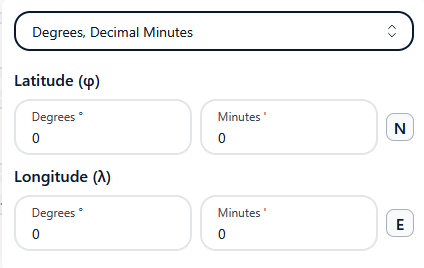
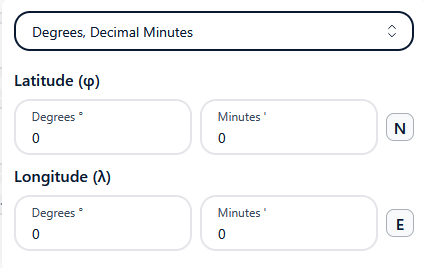
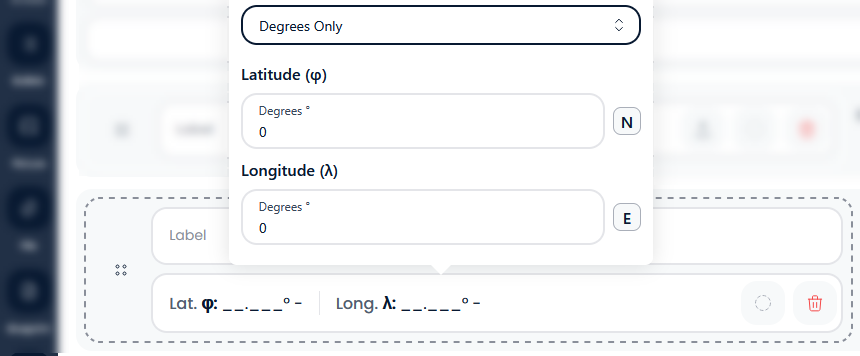
Geo position input with coordinates
Now users can input a location/ Geo position with coordinates latitude and longitude in three different formats.
Web



Other Improvements
Minor visual enhancements and UI adjustments for better usability.
Fixed a critical client-side exception that caused the web app to break.
Resolved an issue preventing user profiles from opening.
Updated the link to the user manual.
Various minor bug fixes and performance improvements.
Note: Do not forget to update your mobile app (Android OS) to version 2.18.0 or higher.
24.4.25
Progress tabs added Activity stream
The new Activity stream features dedicated tabs to only look at activities, whit are in a certain phase of progress. Following tabs are provided: 1. Invitations to Activities or Organizations, 2. Open Activities, 3. Completed Activities, 4. Approved Activities
Web
Other Improvements
Quicker access to an organization’s activities

Users can click anywhere within a window dialogue to bring it to the forefront.
Search functionality added to the activity stream
Sequences added within an activity now cannot deleted
Activities of an organization not visible to Managers/Owners (Now, all activities of an organization can be tracked under Organization → Activities)
Fixed: Issues with the blueprint builder when adding or modifying fields/blocks
Fixed: Missing Edit Organization button
Multiple small GUI improvements
Several minor bug fixes
17.4.25
New units added: Voltage, Current, Resistance etc.
Thanks to new units such as Voltage, Current and Resistance users can now make more structured data input in an activity.
Mobile-App (Android OS)
Other Improvements
New organizations screen
New Settings Screen
Fixed: Blueprint Sync Failure
17.4.25
Share URL / link of a Blueprint
Now users can share the link of a blueprint with others, which makes collaboration much easier.
Web
Other Improvements
Fixed: Clone blueprint malfunction (loses custom type list references)
Fixed: Column header malfunction in Org's membership management screen
Fixed: Instructions not shown in the activity
Multiple minor bug fixes
10.4.25
Stay informed with in app notifications
Users are kept informed about progress of the report generation via toast/ notification messages
Web
Other Improvements
Size of files/ attachments, which can be uploaded limited to 15MB
Filter users of an organization by status
User get informed about progress of triggered report generations via toast messages
Support of new units for custom values for Power / Electricity, Density, Flow Rate, Pressure, Discharge rate (Note: Mobile app needs to be updated, too.)
Minor design (GUI) adjustments
Fixed: Own topics shown under "Subscribed Topics"
Fixed: Redundant Meta information in chat
Fixed: User list on Delegation Screen not sorted alphabetical
Fixed: Cannot edit Disclaimer in Organisation Profile
Instructions not shown in italic in activity
Fixed: Cannot add a profile image to user profile
Fixed: Windows opening behind the clicked window
Fixed: User cannot approve activity, due to mandatory items in an options, which was not selected.
Fixed: Cannot share a topic with org's i am a member of
Fixed: Users unable to add remarks to option block
Fixed: Open button, doesn't open the report.
Multiple minor bug fixes
3.4.25
App available to download on Google Play
Now you can download the Smart Logbook app from the Google Play store and install it on your Android phone. The regional availability of the app will be permanently extended. Contact us, if you cannot find it in your region.
Mobile-App (Android OS)
Google Play Store Availability
The Android app is available in the Play Stores of the following countries.
Germany
India
Italy
Philippines
Singapore
Thailand
United Arab Emirates (UAE)
Note: We will add further countries very soon. Let us know, if you miss your country in that list.
Other improvements
Support new units values (Voltage, Current, Resistance etc.) in Activity
New organizations screen
New Settings Screen
Fixed: Blueprint Sync Failure
3.4.25
Set pins on image and add structured data
Now you can set multiple pins on an image to mark certain findings on it. Related to the pin you can add structured data (information) by selecting a pre-defined activity template.
Web
Important
New URL to login: https://app.nautiluslog.com/
Note that the old URL https://smartdashboard.nautiluslog.com/login will be discontinued in a couple of weeks. Therefore we recommend to update your browser bookmark accordingly.
New Features
Online user manual and documentation available in this section
Setting pins on an image
Creating own locations for your organization
Notification on screen about the status of the report generation
Option to ask the user to select one of multiple options in an activity
Sharing a topic with other organizations
Search bar on dashboard
Clickable table of content in activities
Option to tag input as “Deficiency” or “Observation”, which is highlighted in the final report and listed in dedicated chapters.
Ports shown on map
Move (cut&paste) a picture to another place within activity
Planning Waypoints (Beta)
Voyage Log (Beta)
Vessel shown on map, if voyage log/ tracker is active
Improvements
Multiple GUI improvements (e.g. changed to a flexible window style)
Finding missing mandatory fields in activity easier
ID of activity can be copied and shared.
Improved search function for locations/ ports
Faster generation of PDF reports
Instructions shown in blueprint builder once defined.
Input element on Android now snapping when swiping
Group Topics, Blueprints and Custom Type under the Organization Profile
Make the Activity-ID link human readable
Allow to add an image or file to a chat massage
Search in chat
Bug Fixes
Issue with adding options to custom type lists
Cannot create activity under certain conditions
Remarks not considered as mandatory for Check items, even if defined as being acceptable alternatively
Report generation failure
Activities can be approved despite not all mandatory items are filled
Cannot change the user’s role
Cannot share a topic with Organizations I am a member of.
Cannot remove a blueprint from a topic
Fixes Synchronization issues
Multiple minor bug fixes
API
no changes to be considered